


The Original Baby Shusher App
3.0114.00 Reviews
App Specs
- Version
- 2.2.11
- Updated On
- License
- $1.99
- Downloads
- 10,000+
- Developer
- Shusher
- Categories
- Parenting
- Platform
- Android
Screenshots

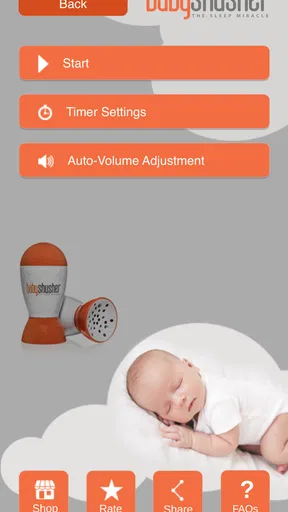
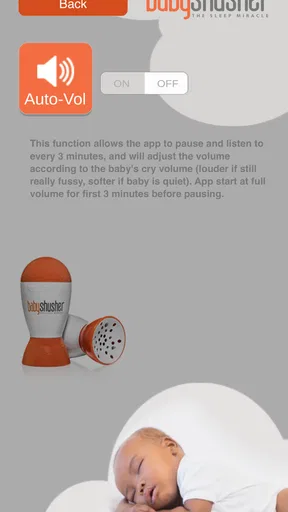
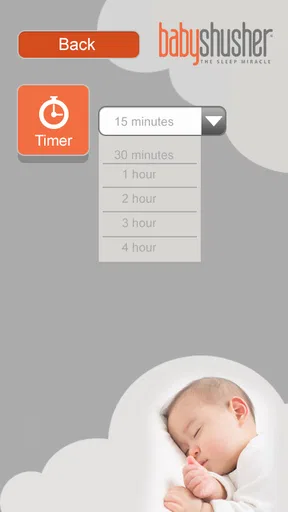
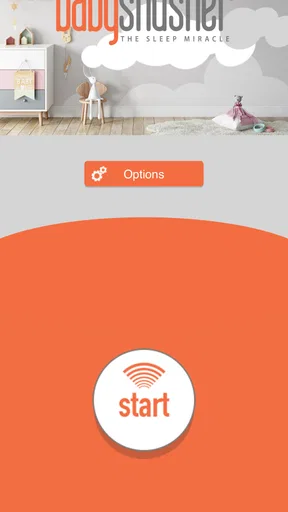

 Analysis by AppCompare
When a baby is overtired, the smallest sound can feel like a major problem. I tested The Original Baby Shusher App with that reality in mind: not as a complete sleep program, but as a focused Parenting app built around one familiar cue, a calm “shhh.” My overall impression is that its simplicity is both its strongest quality and its clearest limitation. It can be useful when a parent needs a steady sound without preparing a playlist, adjusting a complicated routine, or holding a phone close to the crib.
The app is made by Shusher and costs $1.99. It has an Everyone age rating, so its presentation is aimed at a broad audience rather than at older children or specialist users. The current version is 2.2.11 and it runs on Android 6.0 or later. Those details matter because this is an older, narrowly focused tool: I would approach it as a small sleep aid for a specific moment, not as a modern all-in-one baby monitor, tracker, or developmental resource.
How the simple design affects readability and navigation
The first thing I noticed is how little there is to learn. A parent using the app at night does not want to navigate through several layers while holding a tired baby. The central idea is immediately understandable: start a gentle shushing sound and let it provide a consistent background cue. That directness makes the app easier to approach than many sleep applications filled with sound libraries, sleep logs, timers, articles, and subscription prompts.
For readability, a sparse interface is helpful because it reduces visual competition. A tired user can concentrate on the main control instead of scanning a crowded screen. This is especially valuable for someone whose attention is divided between the phone and a restless infant. I also appreciate that the purpose is clear from the name and presentation; there is little risk of mistaking it for a feeding tracker or a white-noise catalog.
That simplicity should not be confused with full accessibility. A minimal screen can still depend heavily on visual recognition, touch accuracy, and adequate contrast on the particular phone being used. People with low vision may need to enlarge the display or rely on the operating system’s accessibility tools, while users with motor difficulties may find a small control less convenient than a larger, more separated button. I did not treat the uncomplicated layout as proof that every user can operate it comfortably.
Navigation is best understood as task-based rather than exploratory. You open it because you want the sound, start it, and return your attention to the baby. That is a good match for the app’s purpose. It is less suitable for parents who want to compare several sound textures, build a bedtime sequence, or adjust a detailed routine. In those cases, the lack of complexity becomes a missing option rather than a welcome simplification.
A practical tip is to set up the phone before the difficult part of bedtime begins. Check the volume in a quiet room, place the device where you can reach it without leaning over the crib, and avoid trying to discover controls while the baby is already crying. This is not a glamorous feature, but it changes the experience: the app works best as a prepared tool, not as something you investigate during a stressful interruption.
Worth Reading Before You Choose

EA SPORTS FC Mobile 26 Is a Bigger Football Game, but It Takes Time

Flipboard Shows What News Apps Must Do Beyond the Feed

Switching to Android Auto Means Rethinking Your Driving Routine

Google Calendar Makes a Crowded Week Easier to Manage

Ludo King Makes the Most of the Minutes Between Plans

Baby Panda World Brings Quick Play to Modern Phones, but Its Game Library Feels Busy
What the focused sound does well
The gentle “shhh” has a particular advantage over music: it does not invite the parent to choose a melody, and it is less likely to become part of a sing-along routine. For some babies, a steady human-like sound can be easier to associate with settling than a changing song. I found the concept most convincing during short soothing periods, especially when the immediate goal was to create a predictable audio layer while holding or rocking a baby.
It can also help a parent who is tired of repeating the same sound aloud. Repeating “shhh” for several minutes is physically and mentally draining, and the app offers a way to maintain that cue without using the parent’s voice continuously. That does not replace touch, feeding, rocking, or medical advice, but it can remove one small burden from the bedtime process.
The trade-off is that one sound will not suit every household. Some babies settle more readily with silence, soft music, a fan-like noise, or a recording that masks changing household sounds. If your child reacts negatively to vocal-like sounds, this particular approach may be irritating rather than calming. I would test it briefly while staying nearby instead of assuming that the store summary’s promise will apply to every baby.
Motor and sensory considerations in real use
From a sensory perspective, the app’s narrow purpose can be reassuring. There is no need to process a large menu of animated choices or rapidly changing audio. A single, gentle sound may be easier for a baby who becomes unsettled by variation, and it may be less demanding for a parent who is already managing crying, dim lighting, and physical contact.
Still, “gentle” is not the same as universally comfortable. Babies differ in how they respond to vocal sounds, and adults differ in how they perceive continuous audio. A parent with sound sensitivity, tinnitus, migraines, or sensory overload may find repeated shushing difficult to tolerate even if the baby accepts it. In that situation, a quieter environmental sound or a tool with more precise audio control could be a better choice.
Volume deserves careful handling. I would begin at the lowest level that can be heard near the baby and keep the phone away from the crib rather than placing it beside the child’s head. The app is a convenience for the caregiver, not a reason to increase sound until it dominates the room. If the baby is sleeping, there is also no need to keep raising the volume to cover every household noise; a consistent, modest background is the more sensible approach.
Motor access is similarly context-dependent. A parent with limited hand movement may appreciate having a sound that can be started with a simple tap, but a small touch target, a slippery phone, or a device placed out of reach can make that tap frustrating. Someone holding a baby with one arm may need to prepare the app in advance. I would also use the phone’s built-in accessibility settings where helpful, such as larger display elements or touch accommodations, while remembering that these settings belong to the operating system rather than being special functions of Shusher.
One non-obvious use is to make the app part of a handoff between caregivers. If one adult has been shushing manually and needs a break, the other can take over without changing the sound cue completely. That can make the transition less abrupt for the baby. It also gives the first caregiver a chance to drink water, adjust posture, or rest their voice. The app’s value here is not sophistication; it is continuity.
Situational access during a normal bedtime
Imagine a realistic evening: the baby has nearly settled after feeding, but a door closes in another room and the child starts stirring. I would start the shushing sound before attempting to pick the baby up, then keep the phone on a nearby stable surface while using a hand for gentle reassurance. If the child calms, I could reduce my own movement instead of repeatedly restarting a sound with my voice. This workflow is more useful than treating the app as a magic sleep switch.
It can also be helpful during travel or a visit to relatives, when the familiar room sounds are missing. A portable, consistent cue may make an unfamiliar environment feel slightly less different. However, the app does not solve every travel problem. A phone may have a low battery, notifications may distract the caregiver, and the surrounding noise may be too loud for a soft shushing sound to remain useful. Preparing the device and silencing interruptions are sensible steps before relying on it away from home.
For nighttime access, the app’s simplicity works in its favor because a parent can use it without reading a long explanation. Yet the phone screen itself can be disruptive. Bright light may wake the caregiver or baby, and repeatedly checking the display can turn a brief soothing attempt into a more active interaction. I would start the sound with the screen dimmed as much as practical and then leave the phone alone.
Another useful situation is when a caregiver cannot comfortably produce a repeated shushing sound because of a sore throat, fatigue, or a need to stay quiet. The app can maintain the familiar cue while the adult focuses on safe positioning and calm handling. I would not use that benefit to justify leaving a baby unattended, though. The app provides audio; it does not watch the child, detect distress, or tell you why the baby is crying.
That distinction answers an important question for new users: is this a monitor? No. It is an audio soothing aid. It should not be treated as a substitute for supervision, safe sleep practice, or professional help when crying is unusual, prolonged, or accompanied by signs of illness. Its role is narrow, and it is most responsible when used within a normal caregiving routine.
Where the app still creates barriers
The biggest barrier is the limited scope. Parents looking for a complete sleep solution may expect timers, schedules, multiple sound options, gradual volume controls, or records of what helped. This app is not the right choice if those tools are central to your routine. A broader white-noise app may offer more flexibility, while a baby-tracking app may be better for recording sleep patterns. The trade-off is that those alternatives can be more crowded and slower to use.
The price is another consideration. At $1.99, it is a small purchase, but the value depends on whether your baby responds to this specific sound. If you already own a reliable white-noise machine, can produce the sound comfortably, or prefer free audio already available on your device, paying for a single-purpose app may not feel worthwhile. I would choose it for convenience and consistency, not because it offers a large collection of content.
The app’s age is visible in the way I think about compatibility and expectations. It was released on October 11, 2013, and its current version remains a focused tool rather than a feature-heavy platform. It has passed the threshold of over 10 thousand installs, but its average rating is 3.0 from around 351 ratings, with 114 written reviews. Those figures suggest a mixed experience among users, which fits my assessment: the concept is clear, but a narrowly targeted sound cannot satisfy every child or caregiver.
There are also situational barriers for people who cannot depend on touch interaction. A caregiver with tremors, reduced dexterity, or one hand occupied may need to prepare the app before bedtime. Someone who is blind or has low vision may need screen-reader or device-navigation support, but I would not assume that every control behaves perfectly with those tools. Likewise, a parent who is deaf or hard of hearing may not benefit from the audio cue in the same way and may prefer a visual or vibration-based sleep aid.
Language and cognitive load can still matter even when the app is simple. A parent who is unfamiliar with the idea of sound-based soothing may need a clear explanation of what the app does and does not do. The best way to reduce uncertainty is to test it during a calm period, observe the baby’s response, and decide whether the sound belongs in the bedtime routine. If it causes agitation, there is no advantage in persisting simply because the app is designed for sleep.
I would also avoid placing too much trust in the word “miracle” associated with the product’s store summary. In my view, the useful part is the practical mechanism: repeated shushing without exhausting the caregiver’s voice. It is not a guarantee of sleep, and it cannot address hunger, discomfort, reflux, fever, overstimulation, or other causes of crying. A good review of this app has to keep that boundary clear.
My inclusive verdict for caregivers
I see this as a sensible small tool for parents who want one familiar, low-effort sound and who are comfortable operating a phone with a simple touch interface. It may suit households where a baby responds well to vocal-like soothing, where caregivers take turns at night, or where travel makes a consistent cue useful. Its uncluttered purpose can reduce decision-making at exactly the moment when attention is limited.
I would skip it if you need extensive customization, visual or vibration-based feedback, detailed sleep tracking, or a sound that can be precisely shaped around sensory preferences. I would also skip it if your baby dislikes shushing or if you already have a sound machine that works reliably. In those cases, the app’s focused design is not an advantage; it simply leaves you with fewer alternatives.
For readers concerned about different abilities, my judgment is cautious but positive. The basic concept is easy to understand, and a short path from opening the app to starting the sound can help people dealing with fatigue or divided attention. At the same time, comfortable use still depends on screen visibility, touch accuracy, hearing, and the ability to prepare the phone safely. I would describe it as potentially approachable, not universally accessible.
The most effective way to use it is to treat it as one layer in a calm routine: prepare the device, keep the volume modest, remain close, watch the baby’s response, and stop if the sound seems unwelcome. That workflow makes better use of its strengths than expecting it to put a baby to sleep on its own.
My final opinion is that Shusher is worth considering when your need is very specific. It avoids the clutter of larger sleep apps and can spare a caregiver from repeating the same sound aloud. But its modest feature set, sensory limitations, and dependence on touch and audio mean it will not be the best answer for every family. Its real strength is dependable simplicity, not a promise of effortless sleep. For the right baby and caregiver, that can be enough to earn a place in the bedtime toolkit.
Pros
- Uses a real human voice rather than repetitive electronic sounds.
- Simple interface makes it easy to start soothing sounds quickly.
- Can help establish a consistent sleep routine for babies.
- Works well as a portable sleep aid during travel or naps away from home.
- Sound playback is generally less distracting than music or bright animations.
Cons
- The shushing sound may not calm every baby or suit every sleep preference.
- Extended playback can drain your phone’s battery.
- Parents must keep the device safely away from the baby’s sleeping area.
- Limited soothing options compared with apps offering music or white noise.
- Some features or content may require payment
- depending on the platform version.
FAQs for The Original Baby Shusher App
What is The Original Baby Shusher App, and how does it work?
The Original Baby Shusher App is designed to help soothe babies with rhythmic, calming shushing sounds. After opening the app, parents can select a shushing track and adjust options such as playback duration or volume, depending on the available version and device. The steady sound is intended to resemble the familiar noise babies hear before birth and may help settle them during naps, bedtime, or moments of fussiness.
Is The Original Baby Shusher App suitable for newborns?
The app is generally intended for infants, including newborns, but it should be used thoughtfully and with adult supervision. Keep the phone or tablet away from the baby’s crib, avoid placing the device under blankets or inside the sleeping area, and use a comfortable, moderate volume. Every baby responds differently, so parents should stop playback if the child appears distressed and follow safe-sleep recommendations from a healthcare professional.
Can I use the Baby Shusher App offline?
Whether the app works fully offline can depend on the version installed and how its audio files are provided. If the sound tracks are stored on the device, playback may continue without an internet connection, which is useful during travel or at bedtime. It is still sensible to open the app and test the main features before relying on it away from Wi-Fi or mobile data.
Does The Original Baby Shusher App run continuously, or does it have a timer?
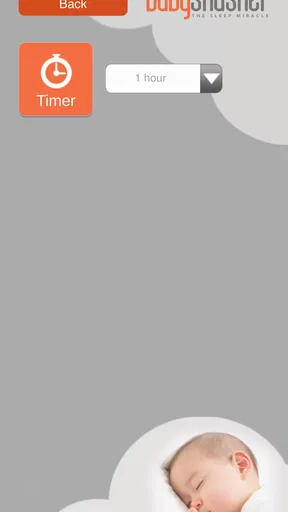
The app is intended to provide controlled soothing audio rather than requiring parents to shush manually for long periods. Available playback controls may include a timer, automatic stopping, or continuous sound, depending on the platform and release. Before downloading, check the current store listing for exact features. A timer can be particularly convenient when the baby has fallen asleep and you do not want audio playing all night.
Is The Original Baby Shusher App free, and are there advertisements or in-app purchases?
Pricing and monetization can vary between the Android and iOS versions, as well as between updates. Some editions may be free to download while offering paid features, removing advertisements, or providing additional sound options through in-app purchases. Review the app-store description and purchase details before installing, especially if the device is shared with children. Also remember that the app is a soothing aid, not a substitute for feeding, comforting, or medical advice.


